

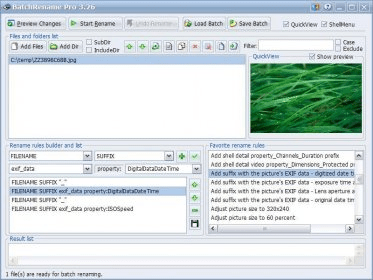
* Support EXIF data - rename digital camera pictures with the EXIF data information: Camera name, Digitized date, Original date time, ISO speed, Exposure time, Shutter speed, Lens aperture, F-Number...
* Support renaming files using their Shell detail properties* - you can use what you see on the columns of Windows explorer (including video properties, audio properties ...) to rename the files.
* Support for MP3 Tag ID3 v1 and v2, rename by music's Title, Album, Artist, Genre, BitRate, Frequency, SubTitle, Language, Comment, Copyright, Composer and etc,...
* Support rename picture files by their Image properties: resolution, color bits, type format.
* Support Rename fles by the local date time format, or file's date time attribute.
* Insert specific length of digits ascending or descending to file or folder names.
* Uppercase/lowercase the first letter of each word, and Uppercase/Lowercase/Remove any specific character in the filenames.
* Support store the renamed files to a different folder by specifying destination output directory.
* Support truncate filename to a specific length.
* Favorite rename rules - you can easily save and pick up your favorite renaming rules. Also, you may ask us to build renaming rules for you, and download them from foryoursoft.com to your favorite directory.
* QuickView* - it allows you view (picture) or play (movie or music) the selected file in the "QuickView" window. So you can see the files directly and decide how to rename them. Also, you can view all the file properties in the quickview area including: MP3 Tag info, Picture's EXIF data, and Windows shell details info. With this, you can easily decide which property you want to use to rename the file.
* Drag and Drop* - It's easy to add files to the renaming list, just drag them anywhere and drop to BatchRename's files list.
* Support windows shell context menu* - The menu item "BatchRename files..." is added to the
 dbForge SQL Tools 6.6
 dbForge Studio for SQL Server 6.6
 dbForge SQL Complete 6.1
 dbForge Source Control for SQL Server 2.7
 dbForge Compare Bundle for SQL Server 6.6
 dbForge Documenter for SQL Server 1.8
 dbForge Data Generator for SQL Server 4.6
 dbForge Index Manager for SQL Server 1.1
 dbForge Data Pump for SQL Server 1.9



Comments